Home | Posts RSS | Comments RSS | Login

Showing posts with label Windows 7. Show all posts

missing drive in Windows 7

Monday, November 29, 2010
Recently i Installed a Windows 7 in my Vista PC and After that i can,t find one of my Hard Drive, After lot of hard work finally i get it back :) . So here am posting a Tutorial How you can Get Back youe Missing Hard Drive in Windows 7. Its simple and Very Easy to get back the Drive.
Fix Missing Drive in Windows 7


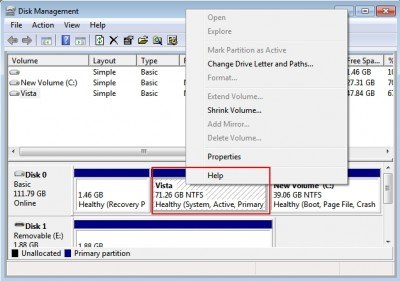
1. Press [Windows], enter [diskmgmt.msc] and hit [enter] to open the Disk Management interface in Windows 7.
2. Now You can see all the hard drives and partitions of the computer system.
Fix Missing Drive in Windows 7
3. Select the partition which don,t have the Drive Letter.
4. Right Click on that Drive and Select “Change Drive Letter and Paths”
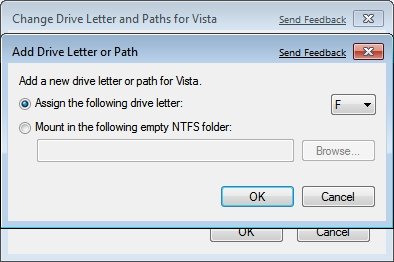
5. Now click the Add button and assign a drive letter to the partition.
windows-7-change-drive-letter
After this your Missing Drive is Visible in Your Windows 7 Computer.

Fix Error Code 801xxxxx with Windows Live Messenger

Monday, December 14, 2009
Windows Live Messenger
Live Messenger
I have been using MSN Live Messenger for a while until I started to run into Error Code Messages.
getting Error Code: 80191002 message.
The reason for this is the conflict with VMware if you happened to install one
FIX Error Code 80191002: To get the error resolved follow the steps below. (I am running Windows 7 , but following same steps should get those errors resolved in Windows XP)


1. First go to Start>Control Panel >Programs and Features
2. In the search box type Live

Live Search
Search Box
or look for Windows Live Essentials and double click to get the Uninstall or repair your Windows Live programs Wizard.

Windows Live Essentials
3. Select Repair
Live Search
Uninstall or repair your Windows Live programs
(Before you click continue make sure to close msn messenger)
Live Search
Close MSN Live Messenger
<4. Once the repair process is done You must restart your computer. If you will not restart your computer and will try to login you will get Error 81000306.

You must restart your computer
Live SearchOnce you will restart your computer you should not long have Error Code 80191002 when trying to sign in to MSN Live Messenger. By following the steps above you might be able to fix other Error Code 801xxxxx. Also you might be able to lunch the repair process by downloading free windows live messenger and lunching the install.

Eye Candy. -->StarDock


some of my friends have been asking me where i get this little expansive bar at top of my windows. the one i am using now is named Stardock. while you can download from

http://www.stardock.com/products/objectdock/downloads.asp#download

of course the free version you can get has less features but already more than enough for normal uses. the one i am using is a cracked version. not anybody knows where to get that and how to crack. so just go with the free one they have there.

should a teenager go for a MacBook over a windows ?

Tuesday, November 24, 2009
hi, Linda,
it is my pleasure to provide you some information on that.

this Mas Book is a different kind of operating system from our normally daily used Windows system. users will have a whole different experience.

Why do so many people like to buy a MacBook? one of the many reasons, also most importantly, is that it is a sign of fashion. its appearance is certainly eye candies and not only teenagers like it, even me personally would love to have one as well. you can drop by at the Apple store at the Eaton Center (http://www.apple.com/ca/retail/eatoncentre/) to get a sense of their products.

speaking of the compatibility, it should not be a concern. there are tons of applications similar to Microsoft Office and other programs designed for Mac Book. they actually perform much better than the Microsoft ones. its Music and Graphic software are the top in the industry and all the professionals are using them.

one last thing i want to put stress on is that Jannie will not feel very comfortable while first using it since its design and concept are very different from Windows. but as an implicit trend, MacBook will be in the future as popular as Windows in normal families. so as to get start ahead, it is more beneficial for Jannie to get used to it.

my opinion is to go with a windows product at the moment. Windows 7 has just com out. it is with beautiful interface as well to satisfy Jannie's desire. it is easier to use and Michael and you are more familiar with it. when Jannie gets into university, it will be the perfect time to get her a MacBook (maybe some XXXBook much better than this MacBook). she will have the ability to get all the software she needs by herself or from her friends(free of charges). and at that time, it will take her 2 or 3 weeks to get used to it since she's already a fast learner by then.

hope the information could help.
Regards.
Peter.


- Hide quoted text -


On Mon, Nov 23, 2009 at 8:02 PM, Linda Wang wrote:
Hi Peter,
 
I'd like to consult you a question on computer, since you're now studying to be an expert in this area.  Janine wants me to buy her an Apple laptop called "Mac Book".  What do you think of this brand? I'm not sure if it will have any compatibility issue with Microsoft Office software, or any other issues I should be aware of.  So I'd like to ask around before making a final decision.  Thanks in advance for your info!
 
Hope you're doing well with your study and internship.  Talk to you later.
 
Linda

How to Dual-boot windows 7 with Linux (with Linux installed first) -- the step-by-step guide

Saturday, November 21, 2009

Scenario: You have Linux already installed but want to dual boot it with windows 7 on the same hard drive.
Summary of tutorial: We'll dual-boot Ubuntu 9.10 with windows 7. With Ubuntu already installed and owning the entire drive, we'll use the Ubuntu Live CD to shrink the Linux partition to create space for the windows install.
windows 7's MBR will overwrite GRUB during installation.

Instructions: 
1. Obtain a copy of Windows7.
2. Partition your disk with fdisk
3. Install Windows7.
4. Re-install Grub.
5. Edit Grub to List Windows 7.


Details:


4. Re-install GRUB

Now you have windows 7 but it has completely eaten your boot loader so you need to re-install grub.
Boot from the ubuntu live cd and go to terminal.
Type in terminal:

"sudo grub"
"grub> find /boot/grub/stage1"

That should return your Ubuntu partition in the form of (hdX,Y), use that:

grub> root (hdX,Y)
grub> setup (hd0)
grub> quit

(you don’t need to type the grub> bit)

That has re-installed grub but you can no longer see windows7

5. Edit grub.
Go to terminal from normal ubuntu and type :

“sudo gedit /boot/grub/menu.lst”

A large text file will open and at the bottom leave a line and add this:

title windows 7 beta (Loader)
root (hd0,1)
savedefault
makeactive
chainloader +1

(Do not type this line but if that does not work on re-boot try “hdo,0 or hd0,2” and so on until it works.)

thanks to hyperdude111 and James Bannan

Sony VAIO running Windows 7

Friday, November 20, 2009
it has been couples of weeks since window7 released. didn't want to install or "upgrade" it till yesterday. VISTA had always been taking a big chunk of my memories.finally i got pissed of then installed this windows 7. got the CD-key from University of waterloo e-academic for free. and it is a business version.


not as good as on youtube showed. so for i have found some bugs flowing around.

1) the VAIO integrated microphone doesn't work. but once i put my now earphone with the little mic, it sounds. thinking the microphone is not yet configured completely when installing all the driver. i have kept eyes on the VAIO official site waiting for the update.

2)display crashed. at some point yesterday, when i tried to use the windows updater while it's updating, the screen died 3 times. and showing chaos and blended colors on the screen. that scared the shit out of me and i thought the system was gonna crash. things are getting better now. haven't seen any display crash since then.